SANs – Critical Log Review Checklist for Security Incidents and Use Case Log sources

SOC triad

Your SOC should have its own nuclear triad of visibility:
- SIEM – if I need to explains this, please read something else instead 🙂
- Network Forensics (NFT) – tools that can capture all network traffic (full packet capture), extract metadata (including application layer, L7 metadata such as HTTP user-agent, DNS query response, FTP username, email subject, etc) and payloads, retain some raw traffic and metadata, enable searching and analysis. There are several commercial tools, and then there are moloch and OpenSOC; Bro sort of fits in as well. [See more details here and in this GTP document]
- East-West/North-South Traffic and Replay
- NetFlow 5 & 9, sFlow, IPFIX
- Endpoint Detection and Response (EDR, formerly ETDR) – typically agent-based tools to capture execution, local connections, system changes, memory activities, etc. There are a lot (A LOT!) of commercial tools, and then there are GRR, MIG (update: not really MozDef, as I mentioned in the previous version) as osquery, sort of. [See more details here and in this GTP document]
Similar to the above, your “SOC triad” seeks to significantly reduce the chance that the attacker will operate on your network long enough to accomplish their goals.
Of course, your SOC will make use of other tools and capabilities, such as threat intelligence (TI) data, malware sandboxes and reversing tools [to push the above analogy a tad too far, maybe this is like a suitcase nuke? Very much an auxiliary weapon, but also very cool? :-)] as well as some workflow system to organize all your work [strategic forces undeground command center?]. However, I always think of SIEM + NFT + EDR as “SOC nuclear triad” of visibility!
In Gartner’s research report, “Applying Network-Centric Approaches for Threat Detection and Response” published March 18, 2019 (ID: G00373460), Augusto Barros, Anton Chuvakin, and Anna Belak introduced the concept of the SOC Visibility Triad. The SOC Visibility Triad helps CISOs meet these critical challenges by increasing security visibility and response capabilities across the infrastructure.
Capabilities of the model include the fusion of:
- Endpoint detection and response (EDR)
- Network detection and response (NDR)
- Security information and event management (SIEM)
Three critical factors for successful SIEM deployment for effective Threat Detection.
This is the first of a number of articles, to discuss the details around developing effective Threat Detection strategy. These articles are specific in nature to each subject matter.
In this article, I explore, three critical factors for successful SIEM deployment, specially concentrating on the first main requirement, selecting optimal logs for your SIEM solution for effective threat hunting.
A modern SIEM should be viewed as a central nervous system, capturing data and generating information that security teams can use as intelligence to detect potentially malicious activity before any damage is realised, providing a safety net that can catch potential threats that might slip through traditional defenses.
Due to their complexity and demanding requirements, security information and event management (SIEM) solution projects fail and/or stall deployments common, where a SIEM solution was acquired and has been quietly gathering dust ever since the initial deployment.
Therefore it is important to follow a simple plan for a successful SIEM Deployment.
The following are (3) three critical factors for any SIEM successful deployment to deliver visibility into your cyber security health in realtime;
- Log sources selection – the data from log sources plays a vital part to give you the visibility of your whole IT real-estate in a single pane of glass.
- Use cases or correlation rules – these are the rules to identify threats using information from you log sources and correlating them threat intelligence.; Example Threats; IoC (Indicators of Compromise), TTP (Tactics , Techniques Procures), MD5, Filenames, IPs, Domains, C2, URLs, ATPs, Registry keys, file hashes,Email addresses, email subject, links and attachments. Trying to identify to Known knowns, known unknowns, unknown unknowns
- Breach Attack Simulation – all too often, events that do make it to the SIEM don’t result in a notable or correlated event because of faulty configurations as well as problems around alerting, parsing, time stamping, routing etc., meaning that the likelihood of a human seeing and responding to the event is very low. Therefore, it is vital to, test Use cases via a Red Team and Attack scenario based on specific exploits.
SIEM Log source selection.
To obtain the maximum value out of a SIEM tool, it may seem tempting ingest and process large amounts of event data at once.
Rather than a “boil the ocean” approach, firstly priorities your logs sources, concentrate on baselining and normalising the following data sources in order of priority.
Consider the following categories to identify your potential Attack Surface;
- External facing Systems
- Security Devices
- Authentication Systems
- SaaS Apps
- Windows Systems
- Linux Systems
- Network Devices
- Internal Systems
- Mobile Devices
- Storage Systems
- COT (commercial off-the-shelf)
<Create Image of above>
Threat Detection in the Cloud is even more complex, while this article does apply to any environment. I will release a more detailed articles on Threat Detection for Azure and AWS in the near future. In short you need to consider;
- Cloud Control Pane
- Cloud Data Pane
- Cloud Services
Here is a list of main log sources for Threat Detection in order of priority;
- Active Directory
- Exchange
- Windows / Linux Servers
- DNS
- Endpoint Anti-Malware
- Network Communication (Firewalls.)
- Web Proxy Request
- DNS
- Authentication
- User Activity
- Audit Trail
- Network Intrusion Detection
- DMZ
- Any thing and everything inside your DMZ are external facing network/edge network. (This means every single IP, Interface and services, etc.
- External Facing web websites/ips, etc.
- WAF
- Internet / North-South Traffic (All external links) (Egress / Ingress)
- Firewalls, Routers, SDNs, WANs and Switches
- Edge Firewalls
- Layer 7 / NGFW
- pfSense + Snorth and OpenID
- IDP/IDS (NIDS) full pack capture
- NIDS (eg. Snort, suricata-ids.org, wazuh.com)
- Full Packet Capture/ TAP/Pcaps/NetFlows (eg. p0f, bro, and prads)
- NetFlow, sFlow , cflow, J-Flow , FNF, IPFIX, NetStream, Appflow
- https://www.ntop.org/
- https://securityonion.net/
- https://suricata-ids.org/tag/pcap/
- NetFlow Security analysis: Detect changes in network behavior to identify network anomalies. NetFlow data is valuable forensic tool to understand and replay the history of security incidents. NetFlow Analyzer accounts for the following details from the NetFlow Packets;
- Source and destination IP address
- Source and destination port number
- Input and output interface number
- DNS
- DHCP Servers (IPMAN)
- Authentication and Identity (AAA)
- IDAM/Identity/Directory Services
- Active Diretory
- LDAP
- TACACS
- User Directory
- Azure AD
- AWS IAM
- RADIUS
- VPN
- MFA
- SSO
- https://www.sailpoint.com/
- https://thycotic.com/
- PAM
- Key management
- IDAM/Identity/Directory Services
- Web Gateway/Proxy
- Email Gateway/Proxy
- CASB/SaaS Apps
- Endpoint Security systems
- antivirus, anti-malware, etc.
- EDR
- eg. https://grr-doc.readthedocs.io/en/latest/
- https://github.com/TheHive-Project
- https://osquery.io/
- MDM
- MAC
- UEBA
- Vulnerability Scanner
- e.g OpenVAS, OpenSCAP
- Continous Monitoring
- Database Activity Monitoring
- e.g. Trustwave DbProtect
- Operation Systems (HIDS)
- https://www.ossec.net/
- https://wazuh.com/
- Windows Systems
- https://www.sans.org/course/windows-forensic-analysis
- https://support.microsoft.com/en-gb/help/256986/windows-registry-information-for-advanced-users
- Powershell events
- DFIR Windows
- Registry Keys –
- Event Logs
- System Resource Usage Monitor
- USN Journal
- Shadow Volume Copies
- Windows Event ID 4688 – https://system32.eventsentry.com/security/event/4688
- Network Connections
- Privilege Escalation –https://virtualizationandstorage.wordpress.com/2019/04/22/windows-privilege-escalation-detection-use-case/

- Linux Systems
- OSX
- HIDS (eg. https://www.ossec.net/)
- East-West Traffic
- Routers
- Switch CAM tables
- Wireless
- NAC
- Storage Systems
- DLP
- FIM e.g https://github.com/Tripwire/tripwire-open-source
- COT (commercial off-the-shelf)
- Device Register
- Asset Register / Risk Profile assessment
- CMDB
- ITSM
- Application Register
- e.g. https://rumble.run
- Log/SIEM
- It can become extermely expensive to deploy Enterprise SIEM/Log solution for your whole network, what you can do is use a Opensource Log collector, just to collect the logs into central location you can control and deploy as you wish and then forward these logs into a Enterprise SIEM platformInsure any opensource projects as commercial support, otherwise you are going to be left old software own your own to update. Make sure you can foward logs into the SIEM in a supported format, or RAW unparsed.
- LogStash
- GrayDog
- Nagios/Zabbix
- https://geekflare.com/open-source-centralized-logging/
- Certificate Management
- Psychical Access/Security

Core Security Technologies
- Firewall
- WAF
- IPS/IDS (NDIS)
- NetMon
- Identity Access Monitoring
- DNS
- DHCP
- AntiVirus
- Email Proxy
- Web Proxy
- CASB
- UEBA
- EDR
- SYSMON (HIDS)
- Application Whitelist
- FIM
- DLP
- Vulnerability Scanner
- Database Activity Monitoring, Vulnerability Management and Rights Management
- Asset Register
- CMDB
- VPNs
- SIEM
- Log Collector
- Routers
- Switches
- Wireless
- MDM
- COT (commercial off-the-shelf)
- Application dependency mapping
- Configuration and Change Management
- Certificate Management
- Encryption Technologies
- SOAR
- Cloud Control Pane and Data Pane Monitoring. (all of the above.)
- Intrusion detection systems
• Endpoint security (antivirus, anti-malware)
• Data loss prevention - • VPN concentrators
- • Web filters
• Honey pots
• Firewalls - • Network logs
• Routers
• Switches
• DNS servers
• Wireless access points - • WAN
- • Data transfers
• Private cloud networks
• Applications and devices
• Application servers
• Databases
• Intranet applications
• Web applications
• SaaS applications
• Cloud-hosted servers
• End user laptops or desktops - • Mobile devices
Use Cases
Examples for threat management use cases include real-time monitoring for external network threats, authentication failures, threat intelligence feed fusion, and user activity and behavior profiling and monitoring, authentication tracking and compromised account detection, tracking compromised and infected systems, malware detection by using network connectivity logs to identify outbound connections, and tracking system changes and other administrative actions. These will be accompanied by incident response processes and automated cross-data correlation and alerting.
Threat detection testing;
Periodic Attack Simulation based on Use cases, Red Teaming, Purple Teaming and Automated Pentesting on your critical assets (DNA – Database, Network, Applications) using tools and methods like;
While testing may seem daunting to some, without it, it is impossible to know whether what you intend on monitoring will actually be feasible. Similarly, simulated attacks should be used to verify that sufficient forensic data is being gathered to allow effective incident or breach investigation, especially sufficient to be used in legal proceedings.
External penetration tests provide an ideal testing bed to ensure that attacks are detectable with your current deployment. It is something that has to be verified before a breach occurs — afterward is too late.
- Option 1 – Manually check that IoCs have been updated across your security controls.This would require checking that security controls such as your email gateway, web gateway, and endpoint security have all been updated with the latest threats’ indicators of compromise (IoCs) usually published by AV companies who detect the malware binaries first.
- Option 2 – Create a ‘carbon copy’ of your network and run the threat’s binary on that copy.While safe, IT and security teams may be unaware of certain variations from the real deal. So while the attack simulation is running against an ‘ideal’ copy, your real network may have undergone inadvertent changes, such as a firewall running in monitoring mode, a patch not being installed on time, and other unintentional variations. The resulting mirror image has inadvertently become a ‘filtered’ one.
- Option 3 – Build a homegrown simulation.While effective, developing your own malware simulation is a time- and resource-intensive effort that usually requires a dedicated threats or vulnerability assessment team.Moreover, even if you have the resources, the turnaround time for getting a live and safe simulation to work may not be ideal.
- Option 4 – Run an automated simulation of the threat in your production environment.What if you could challenge your controls with a threat on the day that it hits the headlines? This is where automated security effectiveness testing can help.By running simulations of the latest cyber attacks against the controls required to detect them correctly, you can make sure your current security arsenal is catching risky IoCs, and close any gaps faster.
- Architecture risk analysis (ARA). About half of the software defects that create security problems are flaws in design. ARA identifies those flaws and determines the level of risks to business information assets.
- Static application security testing (SAST). This helps teams find and fix security and quality weaknesses in proprietary code as it is being developed.
- Dynamic application security testing (DAST). This tool tests applications while they are running, simulating an attack by a hacker.
- Interactive application security testing (IAST). This also tests running applications, but unlike DAST, it uses code instrumentation to observe application behavior and dataflow. It’s useful for CI/CD (continuous integration/continuous delivery) development environments, where the priorities are speed and automation.
- Software composition analysis (SCA). Almost every application in existence today is built, at least in part, on open source software components. SCA finds those components, along with any associated security vulnerabilities that have been reported against them.
- Pen testing. This is best done at the end of development, and is considered an extension of DAST. The goal is to find vulnerabilities in web applications and services and then try to exploit them so developers can fix them before a product hits the market.
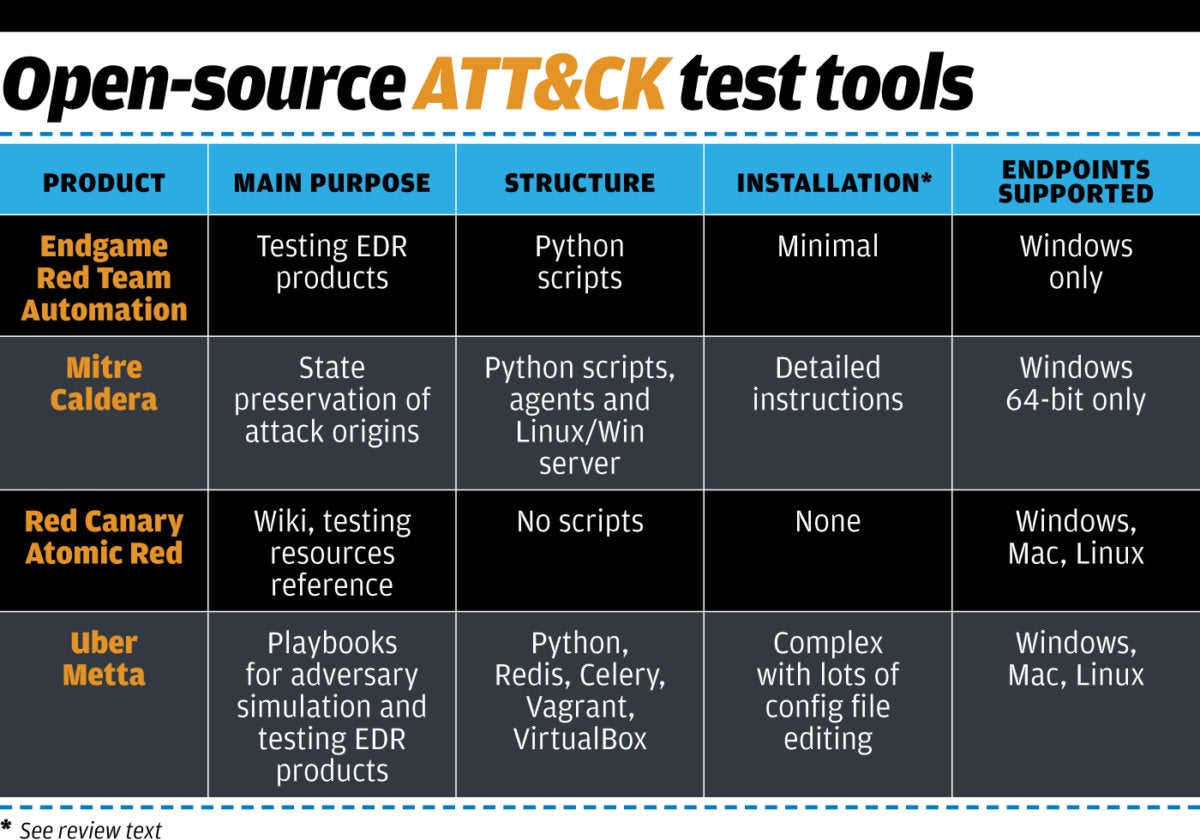
Attack simulation tools;
- Compare Data sources to MITRE
- https://github.com/rabobank-cdc/DeTTACT/wiki/Getting-started#how-to-use-the-framework
- https://github.com/rabobank-cdc/DeTTACT
- https://github.com/Neo23x0/sigma
- https://conf.splunk.com/files/2018/recordings/cops-and-robbers-simulating-sec1244.mp4
-
- OpenSource (Just hire a Pentesting company)
- Kali
- https://raw.githubusercontent.com/hhvn/openvasrun/master/openvasrun.py
- https://github.com/mitre/caldera
- https://attack.mitre.org/techniques/enterprise/
- Mitre Caldera – https://www.youtube.com/watch?v=xjDrWStR68E
- AplhaSOC FlightSim – https://github.com/alphasoc/flightsim
- https://github.com/redcanaryco/atomic-red-team
- Empire – Open Source Post-Exploitation Agent Tool
- https://bammv.github.io/sguil/screenshots.html
- ATPSimulator – https://github.com/NextronSystems/APTSimulator
- Colbat Strike – https://www.cobaltstrike.com/
- https://sectools.org/tool/sguil/
- https://www.sciencedirect.com/science/article/pii/B9781597499576000041
- Enterprise Vendors
- https://www.verodin.com/resource-center
- CoreImpact/Burp Suit
- https://detectify.com
- https://www.pcysys.com/
- https://cronus-cyber.com/
- https://www.hackmetrix.com/
- https://www.immunityinc.com/products/canvas/canvas-third-party-products.html
- AttackIQ – https://www.attackiq.com/
- SafeBreach – https://safebreach.com/
- Sythe – https://www.scythe.io/platform
- Cymulate – https://cymulate.com/free-trial/
- Endgame – https://www.endgame.com/blog/technical-blog/introducing-endgame-red-team-automation
- https://www.netspi.com/resolve-vulnerability-management-orchestration-platform/
- https://thehackernews.com/2019/06/breach-attack-simulation.html
- https://www.esecurityplanet.com/products/top-breach-and-attack-simulation-bas-vendors.html
- https://events.splunk.com/Splunk_ANZ_BOTS_DAY_19?_lrsc=1f1139cc-ef43-49d9-981d-9fd749830f0a&trk=li-leap&utm_source=linkedin&utm_medium=organic&utm_campaign=elevate
- OpenSource (Just hire a Pentesting company)
- https://conf.splunk.com/watch/conf-online.html?search=cops%20and%20robbers#/
- DETECTING COMPROMISED SYSTEMS Analyzing the Top Eight Indicators of Threat Traffic — https://gallery.logrhythm.com/independent-white-papers/uws-detecting-compromised-systems-independent-white-paper.pdf
Beyond Threat Detection, Addressing the the dark side;
The cybersecurity specialist can’t escape from the knowledge that most of their worst days on the job will be caused by co-workers who carelessly/inadvertently circumvent security protocols for the sake of convenience.
- SAE
- policies, procedures, and protocols.
- Ransomware
- Snapshots
- Backup
- SOE
- Email Security
- Web Security
- Antivirus
- DLP
- Application Control
- NextGen Firewall L7
- Data Exposure
- S3
- ELK – https://www.zdnet.com/article/fitmetrix-user-data-exposed-via-passwordless-elasticsearch-server-cluster/
- GIT – https://bounty.github.com/classifications/sensitive-data-exposure.html
- Web Servers, etc.
- FTP, RFP, etc
- Grammerly (the key logger)
- Application Control
- XenDesktop
- SOE – Standard Operating Environment
- SECDEVOPS
- DLP
- Information Protection
- Microsoft Information Protection
- Digital Rights Management
- In hous development (Code Security)
- Security Awareness Training
- Shadow IT monitoring
- Insider Threat
- CASB
- SaaS
- Slack
- Cloud resources S3, etc.
- Youtube,
- UBA/EDR/Layer 7 Traffic/SaaS usage/SaaS Storage/Change Detection
- Slack can expose information simply by someone inviting external into company channel due to slack misconfiguration.
- Grammarly – Key logger , registers all key strokes and was hacked recently.
- (passwordless) Elasticsearch or similar NoSql databases is huge
- Continous Scanning of Databases landscape
- ITIL
- Patch Management
- NPDW
- https://www.networkworld.com/article/3305719/4-ways-next-generation-npmd-solutions-reduce-risk-in-network-transitions.html
- https://www.networkworld.com/article/3305719/4-ways-next-generation-npmd-solutions-reduce-risk-in-network-transitions.html
- SD-WAN
- Network Virtulization
- Traffic Anomaly Based Detection
- Application mapping
- e.g. ScienceLogic
- e.g. AppDynamics
- Network Protocol Analysis
- Network Traffic Mapping
- e.g ExtraHop
- Application mapping
- Environmental Drift, Security Configuration Management, Change detection, Configuration and central management consoles
- e.g. Solar Windows Configuration Manager, AlgoSec, Tuffin, TripWire
- Continuous Monitoring of external facing assets/resources/IP/External facing IP subnet scans
- Can you IT team expose any internal resources external, via Cloud, SaaS, On-prem. There is no technology that can do this, it requires team to create their own tools and continuous scans depending on environment, you can have a 100% secure monitored environment and a SYSADMIn could create a new exposures that is not even monitored, this is one of the major ways data exposures has occurred in recent history. E.g. Exposure of data on S3, backups saved on external facing website, pentest scans, change detection is required.Fraud Detection
- Bug Bounty Programs
- ephemeral resource detection
- Assetnote
- Vendor Risk
- BitSight
- OSINT – Opensource Information gathering data
- https://www.osintmon.com/
- Assetnote
- https://github.com/michenriksen/gitrob
- Dark Web Monitoring
- https://www.hypersight.com/
- http://www.knowlesys.com/
- Forums, News, etc. Public news oppions,
- Reputation – https://www.massivealliance.com/monitoring-dark-web/
- Honey pots
- DDOS
- 24/7 Ahead of the threat – Threat Hunting
- Threat Streams (Governments, etc.)
- STIX/TAXII
- Reference information;
- uws-threat-hunting-101-white-paper
- https://www.sans.org/course/siem-with-tactical-analytics?msc=cishp
- Log sources and Use cases
